Use cases · Developers and AI-first teams
Social media scheduler API and MCP server for Claude
Last updated 2026-11-01 · by Venu Gopal Reddy Muvva, founder
If you want your own code or AI assistant to draft and schedule posts, you need a REST API, webhooks and, for Claude or Cursor, an MCP server. SocialPostScheduler has all three: a REST API with an OpenAPI spec, HMAC-signed webhooks and an MCP server at /api/mcp with tools to list channels, write posts in your brand voice and schedule them. You schedule on demo channels today; live posting is coming soon.
How to do it in SocialPostScheduler
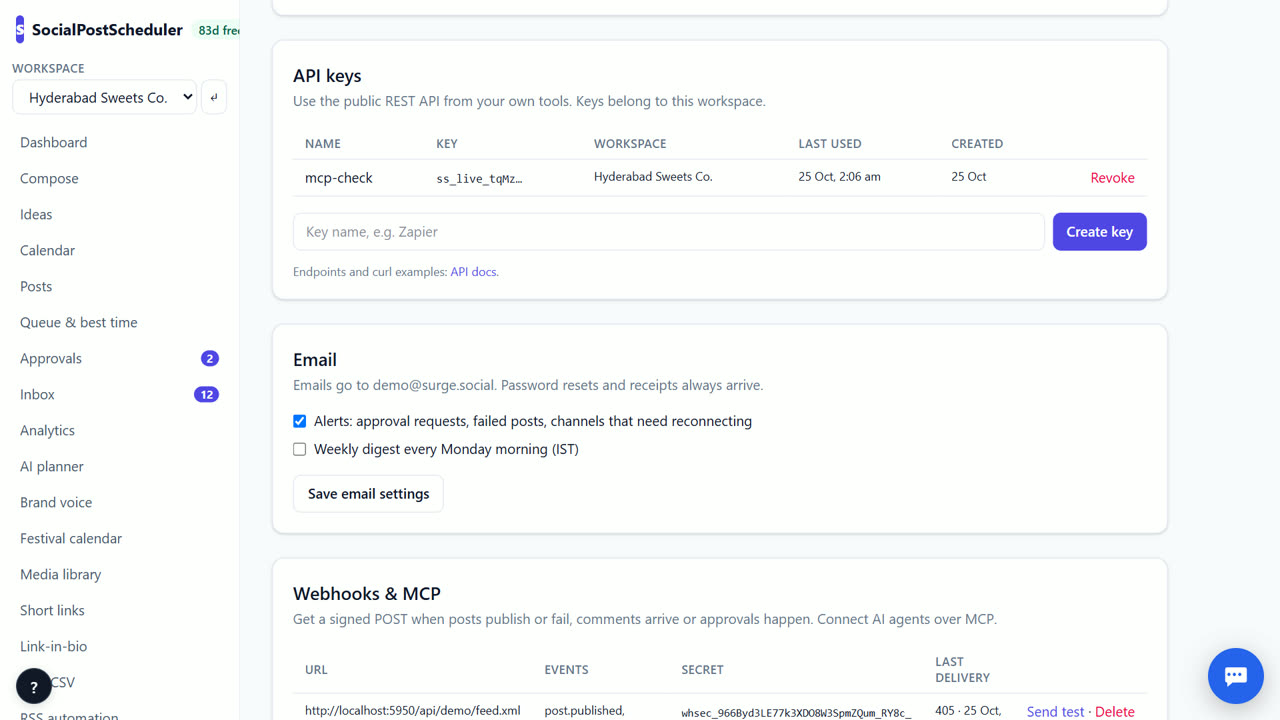
- 1Create an API key
Open Settings → API keys and create a key. It is shown once, so copy it and store it safely.
- 2Call the API
Send the key as a Bearer token. GET /api/v1/channels lists channels; POST /api/v1/posts creates a draft or a scheduled post.
- 3Read the spec
Fetch /api/v1/openapi.json for exact fields, or to generate a client in your language.
- 4Add a webhook
Open Settings → Webhooks & MCP, enter the Endpoint URL, pick Events and choose Add webhook. Use Send test to try it.
- 5Connect Claude or Cursor
Add the MCP server at /api/mcp over HTTP with your API key as a Bearer header. Its tools are list_channels, list_posts, create_post, write_post and get_analytics.
What the API can do
List channels, list posts by status and date, create, read and delete posts, and read analytics for a date range. A post can include a first comment, media URLs, a thread for X, Threads and Bluesky, and recycleEveryDays for evergreen copies.
Keys belong to one workspace. Revoke a key any time from the same page; a revoked key returns 401.
Verify every webhook
Webhooks fire for post.published, post.failed, post.scheduled, inbox.received and approval.decided. Each request carries an x-surge-signature header: an HMAC-SHA256 of the timestamp and body with your endpoint secret.
Check the signature on every request and reject anything older than 5 minutes. Today post.published fires when a post publishes to a demo channel's simulator.
Let an AI assistant run your calendar
With the MCP server connected, you can ask Claude to "draft three LinkedIn posts about our launch and schedule them next week". write_post uses your workspace's brand voice. Keep a human check: send AI-created posts through Approvals if others publish for you.
SocialPostScheduler is free for your first 3 months (90 days from sign-up), with every feature on and no card needed. After that you pay only for what you use, at our cost with no markup. AI writing, month plans and AI images are charged per use from a prepaid wallet. Scheduling, the calendar, approvals, links and the API are not metered. So API calls are free, while write_post counts as AI writing.
When SocialPostScheduler is not the right tool
If you need an API that posts live to real networks today, SocialPostScheduler is not ready; it schedules to demo channels until live posting arrives. If you want to self-host the whole scheduler on your own server or read its source code, Postiz is open source and fits that better.
Questions
- Is the API metered?
- No. Scheduling and API calls are not metered. AI actions such as write_post are charged per use from your wallet after the free period.
- Which MCP tools are there?
- list_channels, list_posts, create_post, write_post and get_analytics.
- How do I check a webhook is real?
- Compute HMAC-SHA256 of the timestamp, a dot and the raw body with your endpoint secret, and compare it with v1 in x-surge-signature.
- Is there an OpenAPI spec?
- Yes, at /api/v1/openapi.json.
Related: Bulk schedule social media posts from a CSV file · AI social media post writer that uses your brand voice · SocialPostScheduler vs Postiz · Pricing