Use cases · Marketers and agencies
Bulk schedule social media posts from a CSV file
Last updated 2026-11-01 · by Venu Gopal Reddy Muvva, founder
To bulk schedule posts, put one post per row in a spreadsheet with a date, time, channels and text, save it as CSV and import it. SocialPostScheduler takes up to 1,000 rows per file and has a Check only button that tests every row against dates, channel names and each network's limits before anything is scheduled. You schedule on demo channels today; live posting is coming soon.
How to do it in SocialPostScheduler
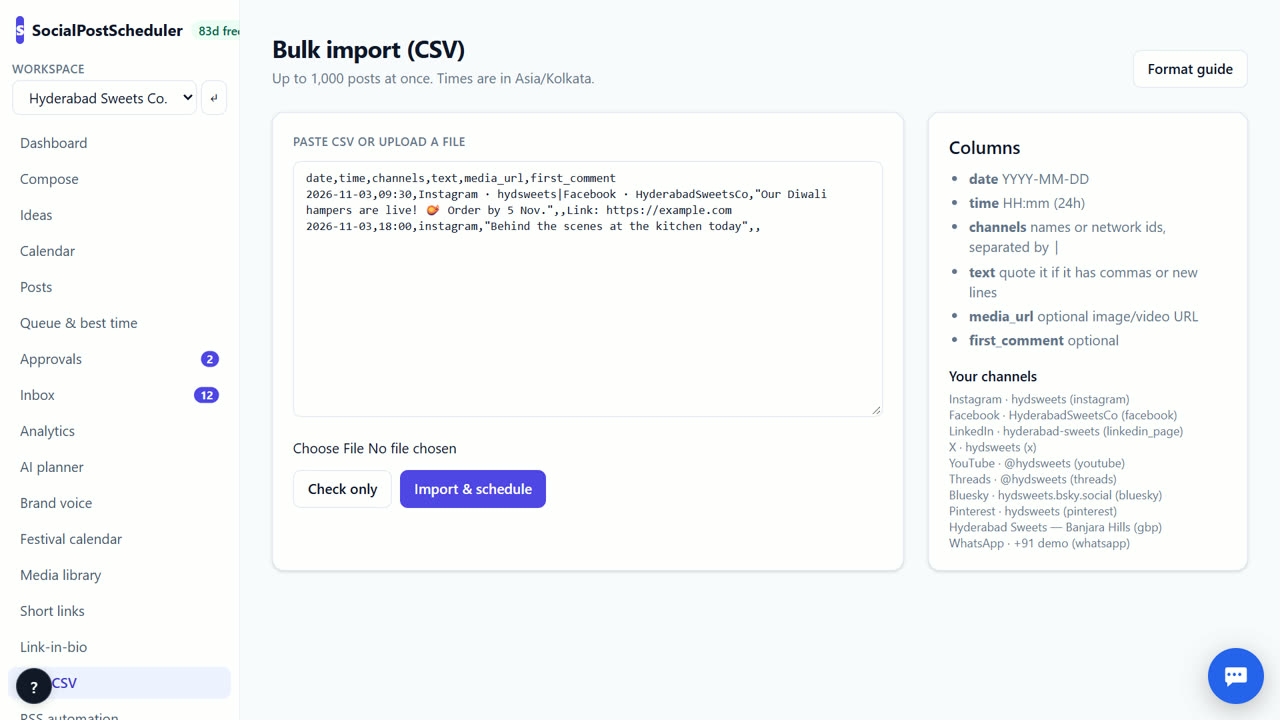
- 1Set your timezone
Open Settings → Workspace and check Timezone. All CSV times use it.
- 2Build the sheet
Use the header date,time,channels,text,media_url,first_comment. Dates are YYYY-MM-DD and times are HH:mm in 24-hour format.
- 3Name the channels
In channels, use channel names or network ids from Your channels on the Bulk CSV page. Separate several with |.
- 4Run a check
Open Bulk CSV, paste the CSV or upload the file, and choose Check only. Problems are listed by line with the reason.
- 5Fix and import
Fix the listed lines in your sheet, check again, then choose Import & schedule.
- 6Review on the calendar
Open Calendar to see every imported post and drag any that need a new day.
Prepare a clean sheet
Wrap any text that has commas or line breaks in double quotes. Most spreadsheet apps do this for you when you save as CSV.
Use media_url only for public links to an image or video. Instagram, Pinterest, TikTok and YouTube need media, so the check flags rows for those networks without it. first_comment is a good place for hashtags or a link.
Why the check-only run matters
A 300-row file with five bad dates is a pain to fix after import. Check only reads every row and tells you which line is wrong and why: a bad date, an unknown channel, or text over a network's limit. Nothing is scheduled during the check.
Fix the sheet, not the posts. Keeping the sheet as your source means you can reuse it next year.
Run the check again after every fix. A clean check with zero problems is the signal to choose Import & schedule.
Good uses for bulk import
Bulk CSV is useful for moving posts from another tool, scheduling a quarter of tips or quotes at once, or loading posts your team wrote in a shared sheet.
SocialPostScheduler is free for your first 3 months (90 days from sign-up), with every feature on and no card needed. After that you pay only for what you use, at our cost with no markup. Bulk import is scheduling, so it is not metered.
When SocialPostScheduler is not the right tool
If you need 1,000 posts to go live on real networks this month, SocialPostScheduler is not the tool yet; posts go to demo channels until live posting arrives. Files over 1,000 rows need splitting. If you want AI to write the posts for you rather than import them, use AI planner instead.
Questions
- How many posts can I import at once?
- Up to 1,000 rows per file. Split bigger files into several.
- What timezone are the times in?
- The workspace timezone from Settings → Workspace.
- Can I post one row to several networks?
- Yes. List several channels in the channels column, separated by |.
- Is there an example file?
- Yes. Choose Format guide on the Bulk CSV page to see the columns and an example.
Related: A free Buffer alternative for small businesses · Turn an RSS feed into social media posts automatically · SocialPostScheduler vs Publer · Pricing