Use cases · Small business owners and creators
AI social media post writer that uses your brand voice
Last updated 2026-11-01 · by Venu Gopal Reddy Muvva, founder
Generic AI posts sound like everyone else. To make AI write like you, give it examples of your own posts and let it learn your tone, words and habits. In SocialPostScheduler you paste 3–20 posts into Brand voice and choose Learn my voice; every AI draft, rewrite and suggested reply in that workspace then follows the profile.
How to do it in SocialPostScheduler
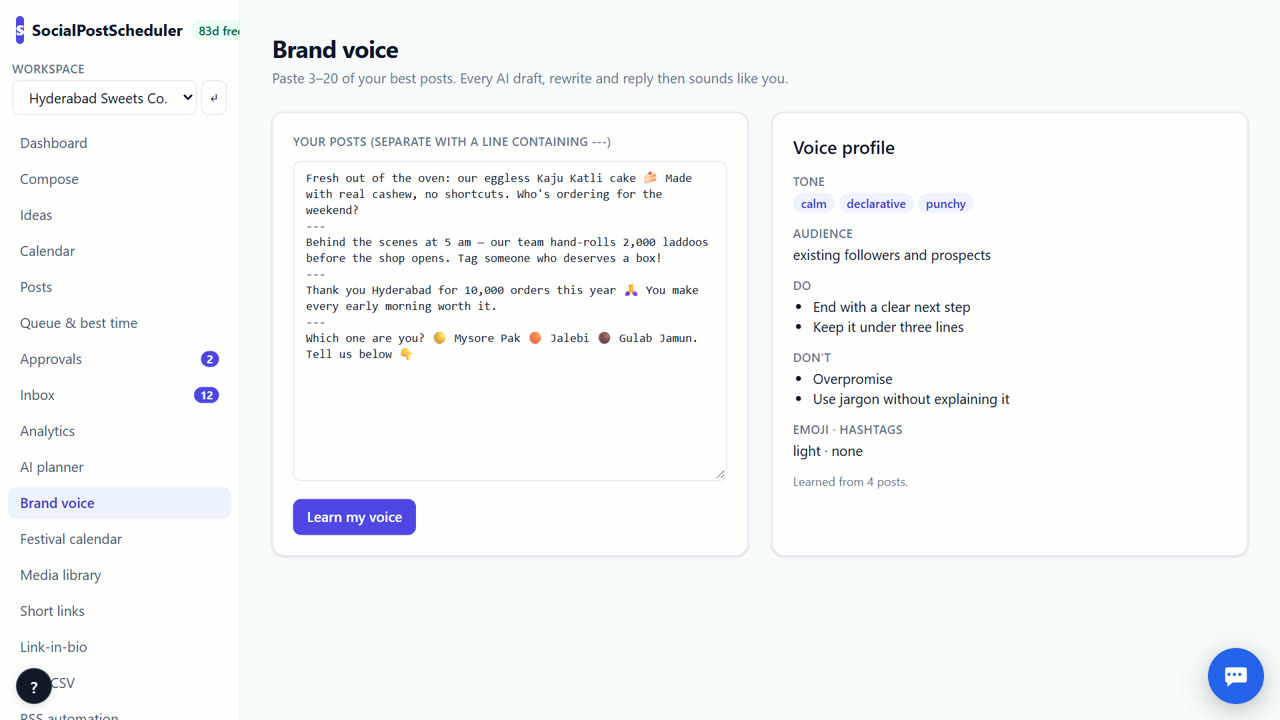
- 1Collect your best posts
Pick 3–20 posts you are proud of. Mix networks if you can, and skip posts someone else wrote.
- 2Paste them in
Open Brand voice and paste the posts, separated by a line containing ---.
- 3Learn your voice
Choose Learn my voice. The Voice profile shows Tone, Audience, Signature words, Don't and Emoji · hashtags.
- 4Write with it
In Compose, type a topic and choose ✍ Write post. Use 🔀 Tailor per network to get versions for each network in the same voice.
- 5Plan with it
Open AI planner and choose ✨ Plan my month. The whole month is drafted in your voice.
Choose samples that teach the right lessons
The AI copies what you show it. If your samples are all sales posts, your drafts will be pushy. Pick a mix: a tip, a story, an offer, a thank-you.
Use posts that did well and that you still like. Remove anything off-brand, such as an old slogan or a joke you would not make today.
Read the profile before you trust it
After Learn my voice, read the profile. Check the tone words and the Don't list. If something is wrong, change your samples and learn again. Adding a clear example of what you want works better than adding more posts.
Update the samples when your style changes, for example after a rebrand.
Even with a good profile, read every draft. Fix facts, prices and dates yourself, and rewrite the first line if it sounds flat. The AI saves you the blank page; you still own what goes out.
One voice per brand
Brand voice is set per workspace. Agencies and people with more than one business keep a separate voice for each. The voice is also used by the MCP write_post tool, so Claude or Cursor can draft in your voice too.
SocialPostScheduler is free for your first 3 months (90 days from sign-up), with every feature on and no card needed. After that you pay only for what you use, at our cost with no markup. AI writing, month plans and AI images are charged per use from a prepaid wallet. Scheduling, the calendar, approvals, links and the API are not metered.
When SocialPostScheduler is not the right tool
If you want posts written in Indian languages, SocialPostScheduler cannot do that yet; that feature is built but switched off. If you write every post yourself and only need scheduling, you do not need the voice feature. And live posting is coming soon; today drafts are scheduled on demo channels.
Questions
- How many posts do I need?
- At least 3 and up to 20. Around 10 varied posts usually gives a good profile.
- Does it learn from posts I edit later?
- No. The profile comes from the samples you paste. Paste new samples and choose Learn my voice to update it.
- Which features use my brand voice?
- ✍ Write post, 🔀 Tailor per network, the AI planner, suggested replies in Inbox and the MCP write_post tool.
- Will my posts sound robotic?
- Less so with good samples. Always read drafts before you schedule them, and edit the first line by hand.
Related: How to plan social media content for a month · A social media planner for agencies with many clients · SocialPostScheduler vs Later · Pricing