Use cases · Small business owners
How to plan social media content for a month
Last updated 2026-11-01 · by Venu Gopal Reddy Muvva, founder
To plan a month of social media content, decide your goal, list the dates and offers that matter, pick 3–4 content themes and write one post per day per network. SocialPostScheduler does the writing part for you: you write one short brief and the AI planner puts a month of drafts on your calendar, festivals included, ready to edit and schedule.
How to do it in SocialPostScheduler
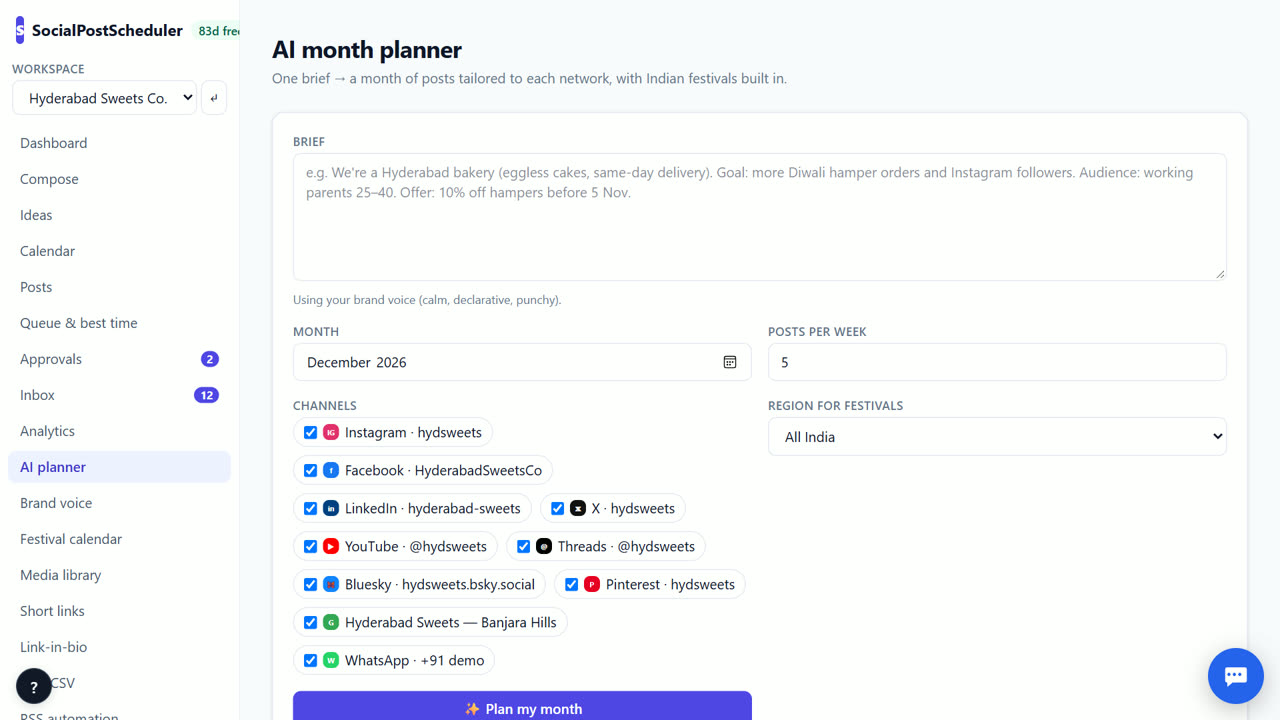
- 1Write your brief
Open AI planner and fill in Brief: what you sell, who it is for, this month's goal, offers and key dates.
- 2Pick the month and pace
Choose the Month, Posts per week and the Channels you want drafts for.
- 3Choose your festival region
Set Region for festivals, or leave All India. Festivals in that month are added as post ideas.
- 4Generate the plan
Choose ✨ Plan my month. It can take up to a minute. You get content pillars and drafts for each network.
- 5Review on the calendar
Open Calendar in month view. Edit, delete or drag any draft. Open one in Compose to use 🔀 Tailor per network again.
- 6Schedule the month
Return to AI planner and choose Schedule all drafts. You schedule on demo channels today; live posting is coming soon.
Start with one goal and a few dates
A month plan works best with one clear goal, such as more orders for a new product or more sign-ups for a workshop. Write it down in one line.
Next, list the dates that matter: launches, sales, events and festivals. These are your anchor posts. Everything else in the month supports them.
Use 3–4 content pillars
Pillars are the few themes you keep coming back to. A bakery might use: behind the scenes, product spotlights, customer stories and tips. Rotating pillars keeps the feed varied without you thinking about it each day.
The planner suggests pillars from your brief. Check them. If one does not fit your business, change the brief and plan again.
Write a brief the AI can use
Say who the audience is and where they are, for example "working parents in Hyderabad". List real offers with real dates. Say what to avoid, such as prices you cannot promise.
Keep it under a page. Your brand voice fills in the tone, so set it up once in Brand voice before your first plan. Then review the month in one sitting. Most people can approve a month of drafts in an evening.
When SocialPostScheduler is not the right tool
If you already have a full content plan in a spreadsheet and only need it posted live today, SocialPostScheduler is not the right tool yet. It can import your sheet with Bulk CSV, but it publishes only to demo channels until live posting arrives. The month planner is the part that saves time; if you enjoy writing every post by hand, you may not need it.
Questions
- How many posts should I plan per week?
- Pick a pace you can keep. For most small businesses 3–5 posts per week per network is enough. Set it in Posts per week before you plan.
- Does the plan publish anything on its own?
- No. Drafts sit on the calendar until you choose Schedule all drafts or schedule them one by one.
- What does a month plan cost?
- SocialPostScheduler is free for your first 3 months (90 days from sign-up), with every feature on and no card needed. After that you pay only for what you use, at our cost with no markup. A month plan is an AI action, so after the free period it is charged per use from your prepaid wallet.
- Can I add festivals I care about?
- Yes. Set Region for festivals before you plan, or open Festival calendar and choose Plan posts with AI for one festival.
Related: An AI social media content calendar you can edit · AI social media post writer that uses your brand voice · SocialPostScheduler vs Later · Pricing