Use cases · Marketers and creators
An AI social media content calendar you can edit
Last updated 2026-11-01 · by Venu Gopal Reddy Muvva, founder
An AI content calendar should give you real drafts on real dates, not just a list of ideas. In SocialPostScheduler the AI planner fills your calendar with a post per day per network from one brief, and you drag, edit and approve them in month or week view. You schedule on demo channels today; live posting is coming soon.
How to do it in SocialPostScheduler
- 1Plan the month
Open AI planner, write a Brief, pick the Month, Posts per week and Channels, then choose ✨ Plan my month.
- 2Open the calendar
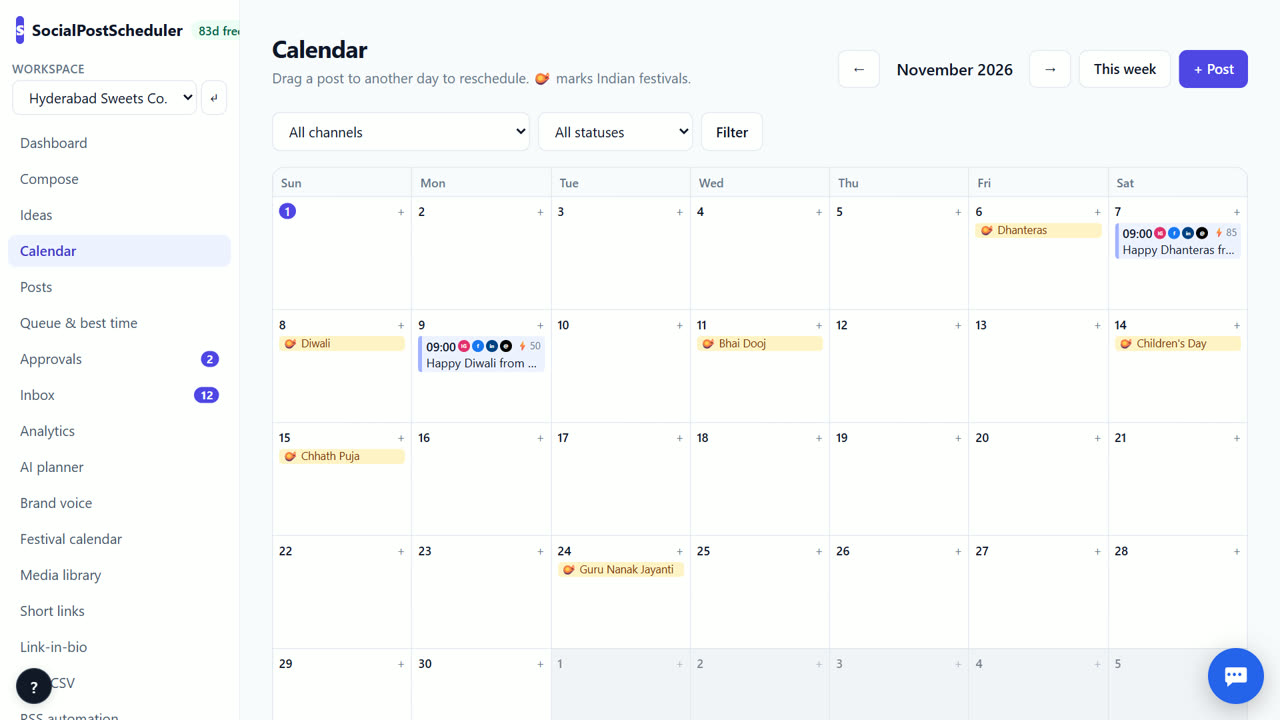
Open Calendar and switch between month and week view. Use the filters to show one channel at a time.
- 3Turn on festivals
Show the festival overlay in Calendar to see upcoming festivals next to your posts.
- 4Move posts around
Drag a post to another day to reschedule it. The time stays in your workspace timezone.
- 5Fix weak posts
Open a post in Compose. Check the Predicted performance score and its top fixes, then edit or use ✍ Write post for a fresh draft.
- 6Schedule
Choose Schedule all drafts in AI planner, or schedule single posts from Compose with Pick a time or Best time ⚡.
What makes an AI calendar useful
A calendar of ideas still leaves you writing every post. A useful AI calendar gives you finished drafts that fit each network: short for X, a hook and short paragraphs for LinkedIn, a caption with hashtags for Instagram.
It should also respect your dates. Put your launches and offers in the brief so the planner builds the month around them.
Check the calendar like an editor
Read the month top to bottom once. Look for repeats, too many sales posts in a row, and gaps on days that matter. Move posts by dragging them.
Then open the few posts that carry the month, such as launch day, and polish them by hand. The performance score helps: it looks at length, media, hashtags, a question or call to action, the time slot and links.
Keep the calendar full after month one
Use the Ideas board to collect ideas during the month and turn them into posts with Create post. Add your blog with RSS automation so new articles become drafts on their own. Tick Evergreen on posts that stay useful so they come back every few weeks.
When SocialPostScheduler is not the right tool
If you need a calendar that already posts live to your networks and shows real network stats, SocialPostScheduler is not ready for that yet. Channels are demo channels and analytics show sample data until networks go live. Pick it if your main problem is filling the calendar with good drafts.
Questions
- Is the AI calendar free?
- SocialPostScheduler is free for your first 3 months (90 days from sign-up), with every feature on and no card needed. After that you pay only for what you use, at our cost with no markup. AI writing, month plans and AI images are charged per use from a prepaid wallet. Scheduling, the calendar, approvals, links and the API are not metered.
- Can I edit the AI drafts?
- Yes. Every draft is yours to edit, delete or regenerate before you schedule it.
- Does it suggest the best time to post?
- Yes. Queue & best time keeps weekly slots per channel and learned best hours. Until a channel has history, it uses network defaults.
- Can my team see the same calendar?
- Yes. Everyone in the workspace sees the same Calendar. Contributors' posts go through Approvals first if you set up a workflow.
Related: How to plan social media content for a month · Predict social media post performance before posting · SocialPostScheduler vs Publer · Pricing