Use cases · Small businesses in India
Indian festival social media calendar for 2026–27
Last updated 2026-11-01 · by Venu Gopal Reddy Muvva, founder
Festival posts work when you plan them a week ahead, not on the day. SocialPostScheduler has a Festival calendar with 40 Indian festivals for 2026–27, filtered by region, with post angles for each and one click to plan posts with AI. Lunar dates are marked "date to verify" so you can check them against the official holiday list before you schedule.
How to do it in SocialPostScheduler
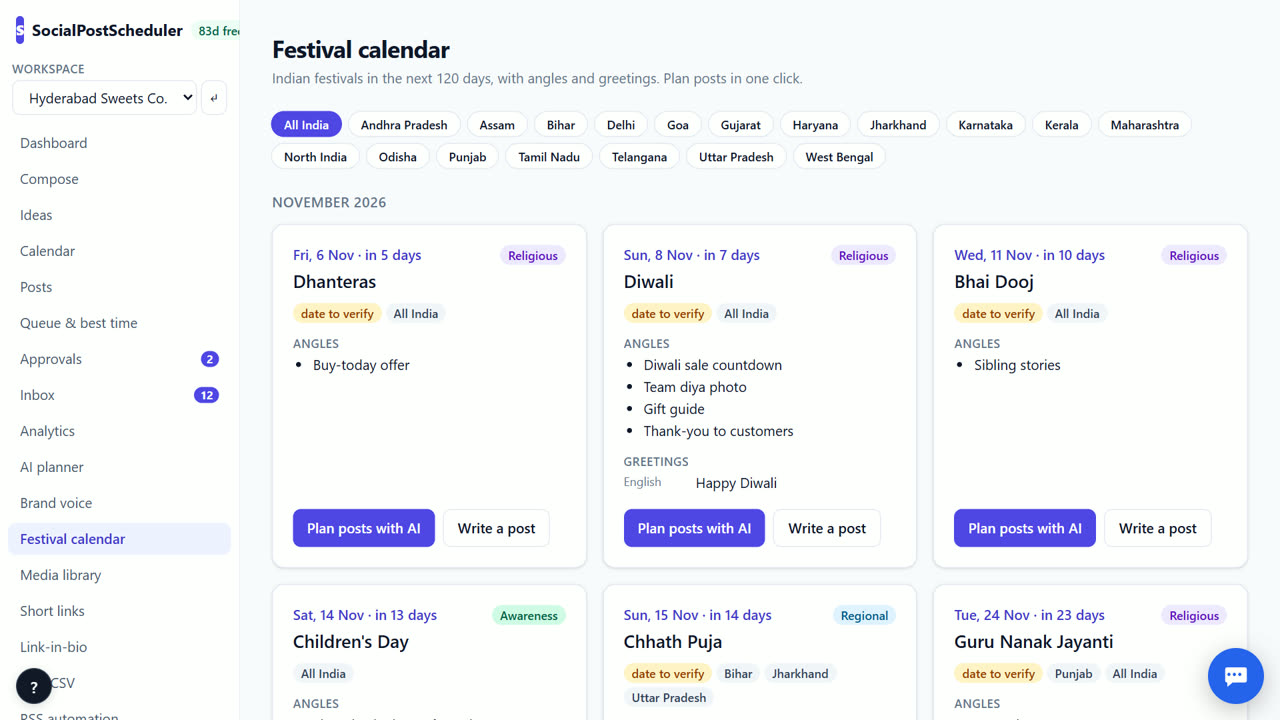
- 1Open the festival list
Open Festival calendar from the left menu to see festivals coming up.
- 2Pick your region
Choose your region, or keep All India, so you see the festivals your customers celebrate.
- 3Check lunar dates
If a festival shows date to verify, check its date against the official holiday list before you plan.
- 4Read the angles
Each festival lists Angles: ideas for what to post, such as offers, wishes or behind the scenes.
- 5Plan the posts
Choose Plan posts with AI for drafts before and on the festival, or Write a post to open Compose.
- 6See it on the calendar
Turn on the festival overlay in Calendar to see festivals next to your posts. You schedule on demo channels today; live posting is coming soon.
Plan festivals in three posts
A simple pattern works for most festivals. One post 5–7 days before with your offer or hours. One post the day before as a reminder. One warm wish on the day, with no hard sell.
Big festivals such as Diwali deserve a longer run. Start two weeks out with gift ideas or order cut-off dates.
Respect regions and dates
India's festivals differ by state. Pongal, Onam, Bihu and Durga Puja matter most in their regions. Posting a regional festival to a national audience is fine, but say who you are wishing.
Many festivals follow the lunar calendar and their dates can shift by a day. That is why some show date to verify. Check before you schedule the day-of post.
Build festivals into your month plan
When you use AI planner, set Region for festivals. Festivals in that month are added as post ideas. Delete any festival draft you do not want from the calendar.
SocialPostScheduler is free for your first 3 months (90 days from sign-up), with every feature on and no card needed. After that you pay only for what you use, at our cost with no markup. AI-written festival posts count as AI writing after the free period.
When SocialPostScheduler is not the right tool
If you need festival posts written in Hindi, Tamil, Telugu or other Indian languages today, SocialPostScheduler cannot do that yet; Indian-language writing is built but switched off. Posts are written in English for now. And live posting is coming soon, so today you schedule festival posts on demo channels.
Questions
- Which years does the calendar cover?
- 2026–27, with 40 festivals and regional tags.
- Why does a festival say date to verify?
- It follows the lunar calendar, so the date can shift. Check it against the official holiday list before scheduling.
- Can I write festival posts in Indian languages?
- Not yet. Indian-language writing is built but switched off, so festival posts are in English for now.
- Is the festival calendar free?
- Viewing it is not metered. SocialPostScheduler is free for your first 3 months (90 days from sign-up), with every feature on and no card needed. After that you pay only for what you use, at our cost with no markup.
Related: How to plan social media content for a month · An AI social media content calendar you can edit · SocialPostScheduler vs Publer · Pricing