Use cases · Marketers and creators
Evergreen social media post recycling, on autopilot
Last updated 2026-11-01 · by Venu Gopal Reddy Muvva, founder
Evergreen recycling means re-sharing posts that stay useful, such as tips, guides and FAQs, every few weeks so new followers see them. In SocialPostScheduler you tick "Evergreen — re-post every N days" in Compose, and after the post publishes a copy is re-queued every N days, up to 3 copies, one at a time. You schedule on demo channels today; live posting is coming soon.
How to do it in SocialPostScheduler
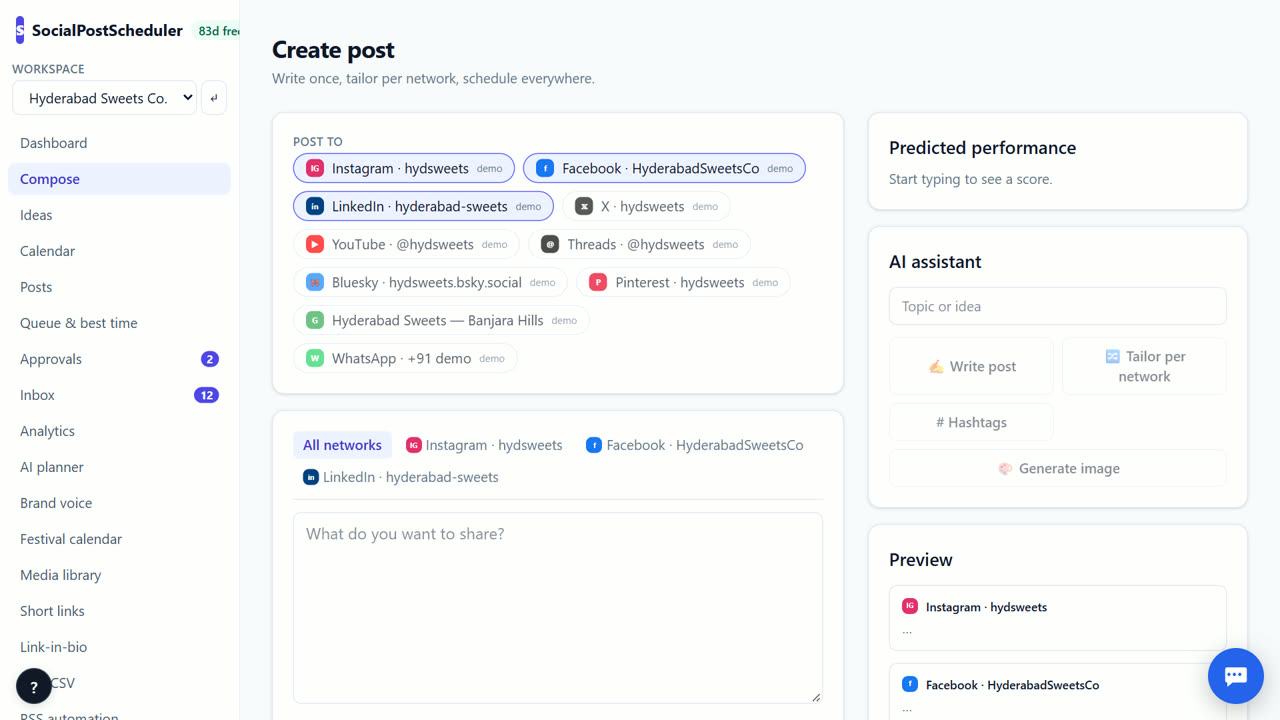
- 1Pick a post that will age well
Choose a tip, how-to or answer to a common question. Avoid dates, prices and "this week".
- 2Write it in Compose
Open Compose, write or paste the post and pick the channels. Use 🔀 Tailor per network if it goes to several.
- 3Tick Evergreen
Tick Evergreen — re-post every and enter the number of days, for example 30.
- 4Schedule the first post
Choose Add to queue, Best time ⚡ or Pick a time. The recycling starts after this first post publishes.
- 5Find the copies
Copies are labelled evergreen. Find them in Posts and on Calendar, and edit or delete any copy before it goes out.
What makes a post evergreen
An evergreen post is just as true in three months. Good examples: how to choose the right size, five questions to ask before you buy, a short guide to your service. Bad examples: sale ends Sunday, this year's festival offer.
Read the post as if it is three months from now. If any word would be wrong then, cut it.
Look at your past posts for ideas. The ones people saved or shared, or the questions customers ask again and again, make the best evergreen posts. Start with five of them.
Pick a sensible gap
Most followers miss most posts, so a repeat is rarely noticed. Still, leave space. A gap of 30–60 days works for most accounts. Busy X accounts can go shorter; LinkedIn pages should go longer.
SocialPostScheduler keeps only one copy waiting at a time and stops after 3 copies, so a post never floods your queue.
Refresh before you repeat
Change the first line of a copy before it goes out. A new hook makes the same advice feel new. Swap the image if you have another one.
SocialPostScheduler is free for your first 3 months (90 days from sign-up), with every feature on and no card needed. After that you pay only for what you use, at our cost with no markup. Recycling is scheduling, so it is not metered.
When SocialPostScheduler is not the right tool
If you want a library of hundreds of evergreen posts that rotate forever, a dedicated recycling tool fits better; SocialPostScheduler re-queues each post up to 3 times. And because live posting is not available yet, recycled copies go to demo channels for now.
Questions
- How many times is a post recycled?
- Up to 3 copies, one at a time. The next copy is queued only after the last one goes out.
- Can I set recycling through the API?
- Yes. Add recycleEveryDays when you create a post with the REST API.
- Can I stop recycling?
- Yes. Delete the waiting copy in Posts or on Calendar.
- Can I change a copy before it goes out?
- Yes. Open the copy from Posts or Calendar and edit it like any scheduled post. A new first line keeps it fresh.
Related: Turn an RSS feed into social media posts automatically · Predict social media post performance before posting · SocialPostScheduler vs Buffer · Pricing